View antivirus results
| Antivirus | Status |
|---|---|
| Kaspersky | No result |
Needs further review: this scanner has not returned a result for this version of the app. | |
| ZonerMobileSecurity | Clean |
| Eset | Clean |
| GooglePlayProtect | Clean |
| ClamAv | Clean |
| Comodo | Clean |
| Symantec | Clean |
| DrWeb | Clean |
| FSecure | No result |
Needs further review: this scanner has not returned a result for this version of the app. | |
| McAfee | Clean |
App screenshots


About this app
File Manager + is an easy and powerful file explorer for Android devices. It’s free, fast and full-featured. Because of its simple UI, it’s extremely easy to use. You can easily manage storages on your device, NAS(Network-attached storage), and cloud storages. What’s more, you can find how many files & apps you have on your device at a glance immediately after opening the app.
It supports every file management action (open, search, navigate directory, copy and paste, cut, delete, rename, compress, decompress, transfer, download, bookmark, and organize) for various file formats including media and apk.
Major locations and functions of File Manager Plus are as following:
• Main Storage / SD card / USB OTG : You can manage all files and folders on both your internal storage and external storage.
• Downloads / New files / Images / Audio / Videos / Documents : Your files and folders are automatically sorted by their types and characteristics so that you can easily find what you are looking for.
• Apps : You can see and manage all applications installed on your local device.
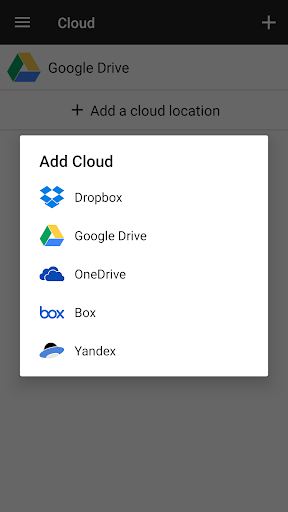
• Cloud / Remote : You can access your cloud storage and also remote/shared storage like NAS and FTP server. (Cloud storage: Google Drive™, OneDrive, Dropbox, Box, and Yandex)
• Access from PC : You can access your android device storage from PC using FTP(File Transfer Protocol).
• Storage analysis : You can analyze local storages to clean up useless files. You can find out which files and apps take up the most space.
• Internal image viewer / Internal music player/ Internal text editor : You can choose to use built-in utilities for faster and better performance.
• Archive management : You can compress and decompress archive files.
- Supported compression archives : zip
- Supported decompression archives : zip, gz, xz, tar
• Supported devices : Android TV, phone and tablet.
What’s new
- Bug fixes and performance improvements.
3.8.3
- Fixed an FTPS connection error
3.7.3
- pCloud support added
- Music player engine changed (switchable in Settings)
- Date format setting added
3.6.8
- 'Copy again' and 'Return to source folder' are available after pasting.
- Added a toggle for video player gestures.
3.6.5
- Temporarily highlight new files with a dot after file operations