

View antivirus results
| Antivirus | Status |
|---|---|
| McAfee | Clean |
| FSecure | No result |
Needs further review: this scanner has not returned a result for this version of the app. | |
| Symantec | Clean |
| Kaspersky | Clean |
| Eset | Clean |
| Comodo | Clean |
| GooglePlayProtect | No result |
Needs further review: this scanner has not returned a result for this version of the app. | |
| ClamAv | Clean |
| DrWeb | Clean |
| ZonerMobileSecurity | No result |
Needs further review: this scanner has not returned a result for this version of the app. | |
App screenshots

About this app
Take full control of your screen orientation with a powerful floating rotation button.
This app lets you control screen rotation anytime, even while using other apps. A customizable floating button stays on top of your screen, giving you instant access to rotation controls wherever you are.
🔄 Instant Rotation Control Anywhere
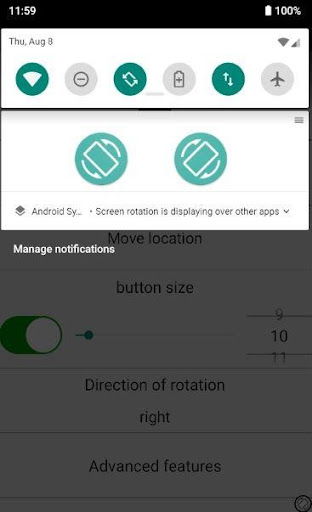
Always-visible floating rotation button
Lock orientation to Portrait, Landscape Right, Landscape Left, or Auto-Rotate
Works across all apps
Option to show the button for only 5 seconds after rotation
📱 Per-App Rotation Settings
Save preferred orientation for each individual app
Automatically apply saved rotation when the app opens
Perfect for games, video apps, browsers, and messaging apps
⚡ Smart Context-Based Rotation
Automatically change screen orientation based on:
🔌 When the phone is charging
🎧 When earphones/headset are connected
Set different rotation preferences for each situation and let the app handle the rest.
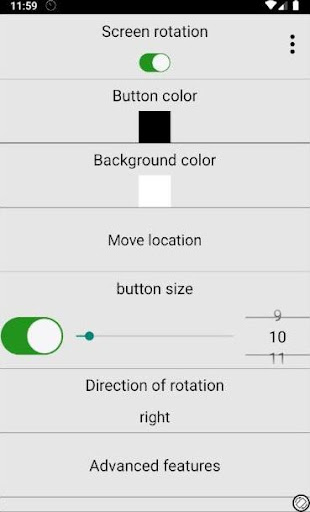
🎨 Fully Customizable Floating Button
Change button icon
Adjust button color
Customize size
Move button anywhere on the screen
Optimize visibility and comfort to match your style
🔒 Smart Auto-Rotate Control
Instantly enable or disable system auto-rotate
Lock and unlock rotation with a single tap
Prevent unwanted screen rotations while lying down or moving
Perfect For:
Watching videos in bed
Playing landscape-only games
Reading in portrait mode
Using apps that don’t support your preferred orientation
Keeping rotation stable while charging
Enjoy simple, fast, and powerful rotation control — anytime, anywhere.
What’s new
Enhanced screen rotation stability and smoother orientation switching. Fixed unexpected screen flips and layout flickering issues. Improved overall system performance and minor bug fixes.


