View antivirus results
checking the app
App screenshots



About this app
Fast Screen Locker is a plugin fo X Launcher and iLauncher app, it is the easiest way to lock the screen. Simply double tap on the blank place of the Launcher, then turn off your screen without press the power button!
FAQ:
1) How to use Fast Screen Locker?
1. Install X Launcher or iLauncher app under this account
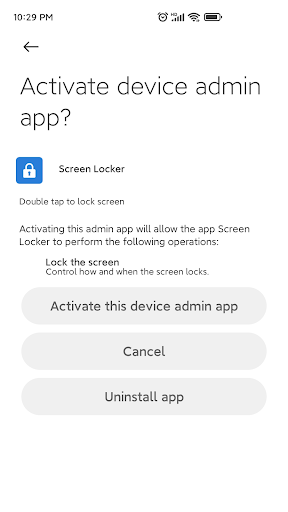
2. Activate Device Administrator for Fast Screen Locker
3. Open Launcher app and double tap on blank space to lock screen
2) How to find "Double Tap Lock" in Launcher app?
1. Swipe up on the Launcher to enter Control Center, then enter launcher settings
2. Go to Launcher Settings > Locker > Double tap to lock screen
3) How to uninstall Fast Screen Locker?
Disable Device Administrator for Fast Screen Locker before uninstall
ATTENTION:
This plugin only use one permission Device Administrator Permission, It is a very sensitive permission, we only use this it to lock screen, please be note.
What’s new
Update privacy policy
Upgrade target sdk to 34