- Install
- 260
- Category
- Education
- Last updated
- 2026 July 20
- Size
- 12 MB
View antivirus results
| Antivirus | Status |
|---|---|
| McAfee | Clean |
| FSecure | No result |
Needs further review: this scanner has not returned a result for this version of the app. | |
| Symantec | Clean |
| ClamAv | Clean |
| Kaspersky | Clean |
| Eset | Clean |
| DrWeb | Clean |
| Comodo | Clean |
| ZonerMobileSecurity | Clean |
| GooglePlayProtect | Clean |
App screenshots

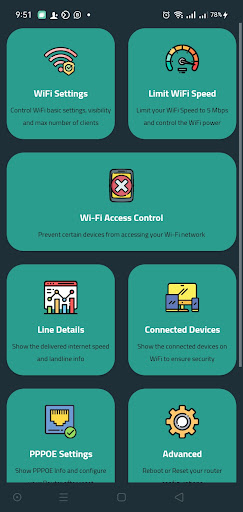


About this app
With the help of the Router Chef App, you can control your Router's basic settings e.g. :
✨ Show Wi-Fi Settings
✨ Change Wi-Fi SSID or Password
✨ Control Wi-Fi max number of connected devices
✨ Limit Wi-Fi speed to 6 Mbps
✨ Control the Wi-Fi signal strength
✨ Show the active connected devices on Wi-Fi
✨ Show the DSL Line Info
✨ Configure your Router with the ISP account after the factory reset
✨ Reboot and reset the Router to factory settings
✨ Change DNS with anti-porn DNS options
✨ Show daily internet usage or from a specific date
✨ Access to the Router configuration page
Supported Routers :
✅ DN8245V
✅ DG8045
✅ HG630V2
✅ HG633
✅ HG531V1
✅ ZTEH188A
✅ ZTEH168N
✅ ZTEH108N
✅ VN020F3
✅ VMG3625
✅ TP-Link TD-W9960
✅ TP-Link TD-W8968
✅ TP-Link VR600
✅ TP-Link VR400
✅ TP-Link VR900
✅ TotoLink ND300
Your Chef is Ready 💝
What’s new
Highlights:
✨ Router model DN8245X6 support
✨ Router model Green Packet IL-410TD-A support
✨ Performance enhancements