
- Install
- 1.2 K
- 3
- 5
- Category
- Personalization
- Last updated
- 2026 October 21
- Size
- 3 MB
View antivirus results
| Antivirus | Status |
|---|---|
| Comodo | Clean |
| Symantec | Clean |
| FSecure | Clean |
| Kaspersky | Clean |
| GooglePlayProtect | No result |
Needs further review: this scanner has not returned a result for this version of the app. | |
| ClamAv | Clean |
| ZonerMobileSecurity | No result |
Needs further review: this scanner has not returned a result for this version of the app. | |
| DrWeb | Clean |
| McAfee | Clean |
| Eset | Clean |
App screenshots


About this app
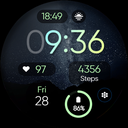
Wear OS Watch Face 🌄 that showcases beautiful landscapes of the sea 🌊 and mountains ⛰️. Enjoy a variety of breathtaking views right on your wrist! 🕒✨
Powered by Watch Face Format
⚙️ Phone App Features
The phone app is simply a tool to facilitate installation and locating the watch face on your Wear OS watch. Only the mobile app contains ads.
⚙️ Watch Face Features
• 12/24h Digital Time
• Date
• Battery
• Heart rate
• Steps Count
• 1 customizable Shortcut (visible)
• 3 customizable Complications
• Power Saver Mode (Check the Store Listing Screens)
• 10 Background Images - Multiple Styles
• Color Variations
• Always ON Display
🎨 Customization
1 - Touch and hold display
2 - Tap on Customize option
🎨 Complications
Touch and hold display to open customization mode. You can customize the field with any data you want.
🔋 Battery
For better battery performance of the watch, we recommend disabling the "Always On Display" mode.
✅ Compatible devices include API level 33+ Google Pixel, Galaxy Watch 4, 5, 6, and other Wear OS models.
Installation and troubleshooting
Follow this link: https://www.recreative-watch.com/help/#installation-methodes
Watch faces don't automatically apply on your watch screen after the installation. That's why you must set it on your watch's screen.
💌 Write to support@recreative-watch.com for assistance.


