View antivirus results
checking the app
App screenshots


About this app
Manage your address book with SA Contacts. Import and export contacts using Excel (XLSX) or VCF files, merge duplicate contacts, and schedule cloud backups. Keep a local copy of your phone contacts and organize different contact lists in multiple address books.
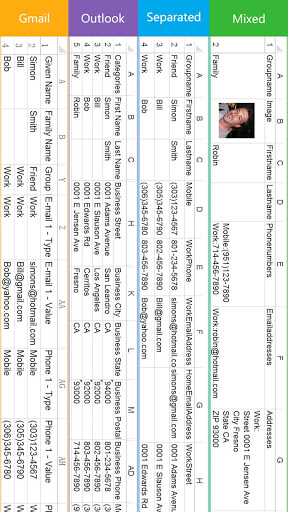
EXCEL AND VCARD IMPORT/EXPORT
Export contacts to Excel for use in a spreadsheet, or import Excel contacts into an address book. You can also import vCard (VCF) files and export contacts in VCF format. Import and export contact photos, including photos embedded in Excel cells.
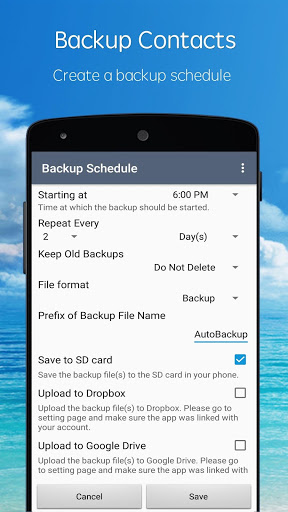
CONTACT BACKUP
Back up your contacts with Dropbox, Google Drive or Box integration. Set up scheduled contact backups to the cloud instead of starting each backup manually.
MERGE DUPLICATE CONTACTS
Automatically identify and merge duplicate contact information while preserving valuable details and photos.
CONTACTS CLEANER
Review duplicates and incomplete entries in a separate local address book before writing the cleaned data back to your phone contacts. This lets you organize your address book before applying the changes to your phone.
MULTIPLE ADDRESS BOOKS
Create separate local address books for different purposes. Import, export and organize each contact list according to your needs.
SMART LOCAL SYNC
Keep a local copy of your phone contacts that updates automatically as your phone contacts change.
FREE TO START, WITH A PRO UPGRADE
The redesigned SA Contacts is available to everyone for free. Upgrade to Pro for:
• An ad-free experience
• Contact imports and exports without limitations
• Backup Schedule with no time restrictions
• A one-time purchase that includes all future updates
ALREADY OWN THE PAID VERSION?
Install and launch the latest version of the paid SA Contacts app on the same device, then restart this app. Your upgrade to Pro will be applied automatically.
What’s new
1. Fixed a crash that could happen when reopening the app after Android closed it in the background.
2. Fixed an issue where merged duplicate contacts were not saved.
3. Fixed the merge contacts screen overlapping the status bar and navigation bar.