- Install
- 2.7 K
- 38
- 4.2
- Category
- Music & Audio
- Last updated
- 2026 November 10
- Size
- 25 MB
View antivirus results
checking the app
App screenshots



About this app
One-tap volume presets + max volume limiter + floating volume button
Volume Control lets you save volume profiles (presets), switch them instantly from your notification favorites, and automate sound with timers & schedules. Add a volume limit (max volume cap) and volume lock (volume locker) to avoid sudden loud audio and accidental changes.
⭐ MOST POPULAR FEATURES
• Volume Presets / Profiles (Alarm, Media, Ringer, Notification, Call/Voice, Bluetooth, System)
• Favorites in Notification for one-tap switching (your go-to presets always visible)
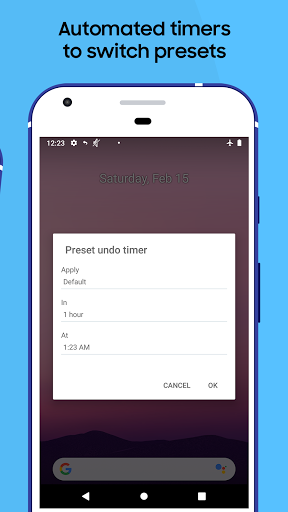
• Preset Timer (apply now, auto-restore later)
• Volume Limiter (set a max volume limit / cap) + Volume Lock (prevent changes)
• Floating Volume Button (overlay control) for quick access anywhere
• Widgets (Preset, Preset List, Volume Locker, Ringer mode, Vibrate, Dashboard)
ONE-TAP PRESETS (VOLUME PROFILES)
Create presets for every situation—then switch with a single tap.
Examples:
• Meeting: silent ringer + low media
• Workout: louder media + Bluetooth levels
• Sleep: quiet notifications + alarm ready
FAST ACCESS: FAVORITES IN YOUR NOTIFICATION
Pin your most-used presets as notification shortcuts so you can switch sound instantly—no app digging, no extra taps.
PRESET TIMER + SCHEDULED AUTOMATION
Make your phone change volume automatically when life changes.
• Timer: apply a preset for 15 minutes, 1 hour, etc., then restore automatically
• Time schedules: morning/night routines
• Bluetooth / Headphones: switch when you connect
• Location / Wi-Fi: switch when you arrive
• Calendar events: meetings, classes, appointments
VOLUME LIMITER (MAX VOLUME CAP) + VOLUME LOCKER
Avoid “volume jumps” by setting a maximum volume limit and keeping levels steady with a volume lock. Great for music, videos, games, and pocket-press protection.
FLOATING VOLUME BUTTON (OVERLAY CONTROL)
Enable a movable floating volume button that sits on top of apps, giving you instant access to volume controls and presets—even in full-screen apps.
WIDGETS (HOME SCREEN SHORTCUTS)
Interactive widgets include:
• Preset (apply a set of audio settings)
• Preset List (choose any preset)
• Volume Locker (change/lock volume levels)
• Vibrate (toggle vibrate settings)
• Ringer (silent / vibrate / normal)
• Dashboard (multiple volume controls)
EXTRA TOOLS
• Separate ringer and notification volume (where supported)
• Change ringtones for alarm, ringer, and notifications
• “Pocket Locker” style protection to reduce accidental changes
• Custom themes (where available)
• Tasker / Locale integration via built-in preset plugin
OPTIONAL UPGRADE
An optional purchase is available to unlock everything (options may be offered in-app).
NOTES
Some features (like the floating button) may require “Draw over other apps” permission. Some devices may require a reboot for widgets to appear.
MULTI-LANGUAGE SUPPORT
Volume Control is available in over 20 languages, including Indonesian, Portuguese, Spanish, Japanese, Thai, Arabic, Turkish, Vietnamese, Korean, and Simplified & Traditional Chinese.
What’s new
Reduced resource usage