
View antivirus results
| Antivirus | Status |
|---|---|
| Comodo | Clean |
| GooglePlayProtect | Clean |
| Symantec | Clean |
| DrWeb | Clean |
| McAfee | Clean |
| ZonerMobileSecurity | Clean |
| Kaspersky | Clean |
| ClamAv | Clean |
| Eset | Clean |
| FSecure | No result |
Needs further review: this scanner has not returned a result for this version of the app. | |
App screenshots


About this app
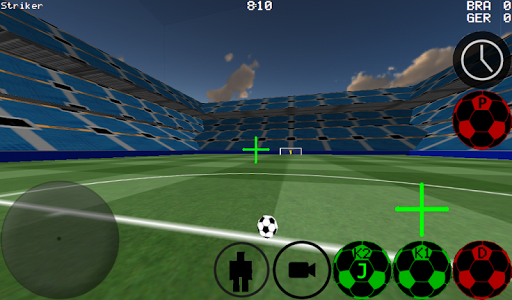
First person view soccer, also supports 3rd Person, top and stadium view
-Advanced control of the ball for dribbling and kicking
-Play 4 vs 4, to 11 vs 11.
-Become any player on the field
-Auto dribble and manual dribble and options
-Play as goal keeper.
-Free kicks practice
-Corner kick practice
-Against the wall practice
-Free style
-Ball spin
-Supports time slow down to make a good shot
-Supports Multiplayer LAN and Internet up to 5 vs 5.
-K1, K2 Kicks the balls where your looking at
-Two Stadiums
-Experimental Xbox 360 Controller Support via USB
Xbox 360 via USB Controller Layout
A = Dribble Button
X = Medium Kick (in Camera Direction
Y or RIGHT BUTTON High Power Kick (in Camera Direction
B = PASS ( Ai Pass's to player)
START = Change Camera
LEFT Button = Slow Time
UP PAD = Change Player
BACK = RETURN TO MENU
RIGHT HAT = Camera Control
LEFT HAT = Player Movement
To setup the WAN/LAN server.
1. Turn on Wifi (make sure it connects to a Router/Modem
2. Click on LAN GAME
3. Click on START SERVER
4. Click Connect ( once or Twice ) Your now connected to the server as Player and Also your the Server.
To connect to the server (lets say your the second player)
1. Turn on Wifi (make sure it connects to the same Router/Modem of the server.
2. Click on LAN GAME
3. Click on CONNECT a few times. (Now connected to the game)
Playing over the Internet Creating Server
1. PortForward port 2500 on the Modem/Router to the IP of your Phone or Tablet
2. Click on LAN GAME
3. Click on START SERVER
4. Click Connect ( once or Twice ) Your now connected to the server as Player and Also your the Server.
TO CONNECT TO INTERNET SERVER
1. CLICK LAN CONNECT
2. CLICK IP / TI SERVER
3. ENTER IP OF THE SERVER eg 201.21.23.21 etc click connect IP once or twice till in
What’s new
-Server ball lag fix. Now checks players last position and server balls position, to make sure they are with in range for a kick.


